Using Album Art as a Desktop Background with cmus
I live in the terminal all day, so my music player of choice has been cmus for over a decade now. It’s fast, keyboard-focused, and has some nice support for scripting for the terminally-terminal-bound like me. One integration I like is having the current album be the basis of the desktop background; here it is in action:
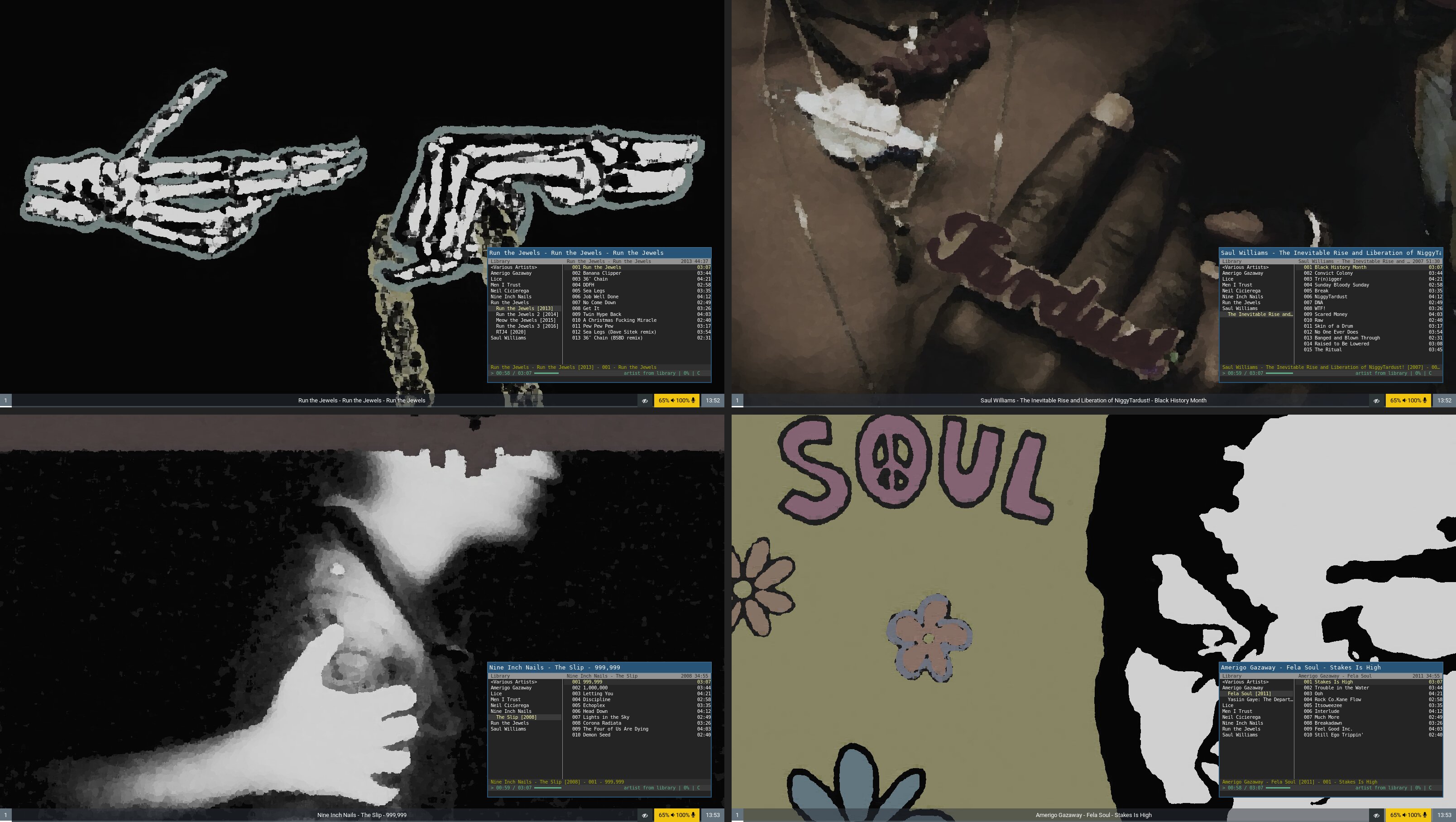
I originally wrote this script for i3/X, but recently moved over to Sway, which required a bunch of updates, so here it is for those who share my unhealthy aversion to GUIs.
First, add this to your cmus config:
set status_display_program=cmus-status
Here, cmus-status is a bash script I have that does minor processing of the currently-playing track. In order to make the album background script (and our tmux status script) a bit simpler, this helper script writes out metadata for the playing track to a temporary file, that is then read by other scripts. You could probably combine them into one script, but I didn’t:
#!/bin/bash

set -euo pipefail
IFS=$'\n\t'

main() {
  # Args are passed in but annoying to parse, easier to call into `cmus-remote`
  if ! command_exists cmus-remote; then
    return
  fi

  local album
  local albumartist
  local artist
  local cmus_status
  local file
  local mb_track_id
  local player_status
  local status_file_path="/tmp/cmus-status.txt"
  local title

  cmus_status="$(cmus-remote -Q 2>&1)"

  if grep -q "cmus is not running" <<< "${cmus_status}"; then
    rm -f "${status_file_path}"
    return
  fi

  player_status="$(grep -e '^status' <<< "${cmus_status}" | head -n 1 | awk '{print $2}')"

  if [[ "${player_status}" == "stopped" || "${player_status}" == "exiting" ]]; then
    rm -f "${status_file_path}"
    return
  fi

  album="$(grep '^tag album ' <<< "${cmus_status}" | cut -d ' ' -f 3-)"
  albumartist="$(grep '^tag albumartist ' <<< "${cmus_status}" | cut -d ' ' -f 3-)"
  artist="$(grep '^tag artist ' <<< "${cmus_status}" | cut -d ' ' -f 3-)"
  file="$(grep '^file ' <<< "${cmus_status}" | cut -d ' ' -f 3-)"
  mb_track_id="$(grep '^tag musicbrainz_trackid ' <<< "${cmus_status}" | cut -d ' ' -f 3-)"
  title="$(grep '^tag title ' <<< "${cmus_status}" | cut -d ' ' -f 3-)"

  cat > "${status_file_path}" <<CMUS_STATUS
${player_status}
${title}
${artist}
${album}
${albumartist}
${mb_track_id}
${file}
CMUS_STATUS

  # Update status bar if running in tmux
  if [[ -n "${TMUX:-}" ]]; then
    tmux refresh-client -S
  fi

  if [[ -n ${WAYLAND_DISPLAY:-} ]]; then
    # Run in background since PNG generation can take a while
    cmus-album-background >> /tmp/cmus-album-background.log 2>&1 &
  fi

  command_exists cmus-scrobbler && cmus-scrobbler >> /tmp/cmus-scrobbler.log
}

main "${@:-}"
One lesson learned here was to make sure the background-generation (cmus-album-background) script runs asynchronously, since otherwise cmus waits for it to complete.
#!/usr/bin/env bash
#
# Generate desktop background from currently playing album

set -euo pipefail
IFS=$'\n\t'

default_bg="#222222"
tmp_art_path="/tmp/cmus-album-bg-blurred.png"
previous_folder_path="/tmp/cmus-album-folder-path.txt"

clear_background() {
  swaymsg "output * background ${default_bg} solid_color"
  rm -rf "${tmp_art_path}" "${previous_folder_path}"
}

main() {
  local album_dirpath
  local art_path
  local previous_dirpath
  local resolution
  local status

  if [[ -z ${WAYLAND_DISPLAY} ]]; then
    echo "Not running under Wayland, aborting"
    return 1
  fi

  if [[ ! -f /tmp/cmus-status.txt ]]; then
    echo "No cmus status file found, removing background"
    clear_background
    return
  fi

  status="$(sed -n 1p /tmp/cmus-status.txt)"
  if [[ "${status}" == "stopped" ]]; then
    echo 'cmus stopped, removing background'
    clear_background
    return
  fi

  album_dirpath="$(sed -n 7p /tmp/cmus-status.txt | xargs -0 dirname)"
  previous_dirpath="$(cat "${previous_folder_path}" 2>/dev/null || true)"
  echo "${album_dirpath}" > /tmp/cmus-album-folder-path.txt

  if [[ "${album_dirpath}" == "${previous_dirpath}" ]]; then
    echo 'already set to current album'
    return
  fi

  art_path=$(find "${album_dirpath}" -type f -name "folder.*" 2> /dev/null | head -n 1)
  if [[ ! -f "${art_path}" ]]; then
    echo "album art file not found in ${album_dirpath}, exiting"
    clear_background
    return 1
  fi

  resolution="$(swaymsg -t get_outputs | jq -r '
    .[] | select(.focused) | "\(.current_mode.width)x\(.current_mode.height)"
  ')"
  convert "${art_path}" -background "${default_bg}" \
    -scale "${resolution}"\^ -paint 6 \
    -modulate 100,20,100 -fill "${default_bg}" -colorize 20% \
    "${tmp_art_path}"

  echo "setting background to ${tmp_art_path}"
  swaymsg "output '*' background ${tmp_art_path} fill"
}

main "${@}"
The code is (hopefully) fairly straightforward, but there are a few pieces nerds may find of interest:
swaymsg -t get_outputsgets the resolution of the focused display, which we then use for all other displays. This works fine for my machine since all my monitors have the same resolution, but you may want something different-scale "${resolution}"\^makes the cover large enough to fill the display while preserving its aspect ratio-paint 6smears away the details so icons and windows remain readable-modulate 100,20,100drops the saturation down to 20%; otherwise some backgrounds end up a bit much-colorize 20%darkens the result a bit, which I found helped a lot with keeping the backgrounds from being too intense- We cache the previous album path so we can early-exit when there’s no update
Finally, swaymsg sets the background on every display:
swaymsg "output '*' background /tmp/cmus-album-bg-blurred.png fill"
I really like this script, but in practice I don’t actually see my desktop background much since I’m using a tiling window manager. I do see it on the lock screen though. If you pay by the CPU minute, then likely you’d want a script that only generates and sets the background when sway locks, but then you’d miss out on the 0.01% of the time where you’re not covering all your monitors with tiled windows, and do you really want to live that dangerously?!