Stylistic Alternates
Bickham Script Pro is a very sophisticated OpenType font, with very nice contextual alternates and ligatures. What sets Bickham apart is the alternate forms it provides – here are the ten (10!) different versions of the lowercase letter “h” available in the font:
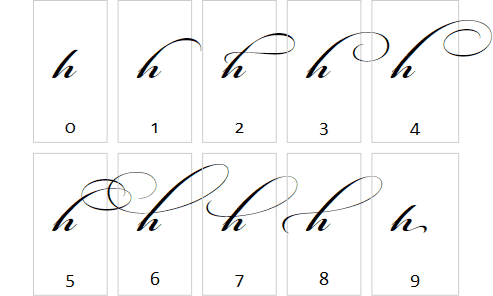
In Avalon, you can choose between the alternates through the Typography.StylisticAlternates property. Most of the alternate forms shown above look best at the beginning of a word, but some (like #9) are meant for the end of the word.
Here’s the full markup for the screenshot shown above:
<Grid xmlns="http://schemas.microsoft.com/winfx/avalon/2005"
      xmlns:x="http://schemas.microsoft.com/winfx/xaml/2005"
      HorizontalAlignment="Center">
  <Grid.Resources>
    <Style TargetType="{x:Type Border}">
      <Setter Property="Margin" Value="5" />
      <Setter Property="Padding" Value="20,0" />
      <Setter Property="BorderThickness" Value="1" />
      <Setter Property="BorderBrush" Value="#ccc" />
    </Style>
    <Style x:Key="AlternateDisplay" TargetType="{x:Type TextBlock}">
      <Setter Property="FontFamily" Value="Bickham Script Pro" />
      <Setter Property="FontSize" Value="60" />
    </Style>
    <Style x:Key="AlternateLabel" TargetType="{x:Type TextBlock}">
      <Setter Property="FontFamily" Value="Calibri, Verdana" />
      <Setter Property="FontSize" Value="20" />
      <Setter Property="Margin" Value="10" />
      <Setter Property="HorizontalAlignment" Value="Center" />
      <Setter Property="VerticalAlignment" Value="Bottom" />
    </Style>
  </Grid.Resources>

  <Grid.ColumnDefinitions>
    <ColumnDefinition Width="Auto" />
    <ColumnDefinition Width="Auto" />
    <ColumnDefinition Width="Auto" />
    <ColumnDefinition Width="Auto" />
    <ColumnDefinition Width="Auto" />
  </Grid.ColumnDefinitions>

  <Grid.RowDefinitions>
    <RowDefinition Height="Auto" />
    <RowDefinition Height="Auto" />
  </Grid.RowDefinitions>

  <Border>
    <TextBlock Style="{StaticResource AlternateDisplay}">
      <Inline Typography.StylisticAlternates="0">h</Inline>
    </TextBlock>
  </Border>
  <!-- ... alternates 1 through 9 follow the same pattern ... -->
</Grid>