A Tale of Two Transforms
In my last post, I briefly mentioned the difference between a layout-affecting transform and a render-only transform. Here’s a screenshot and markup for a quick sample which illustrates the difference between the two:
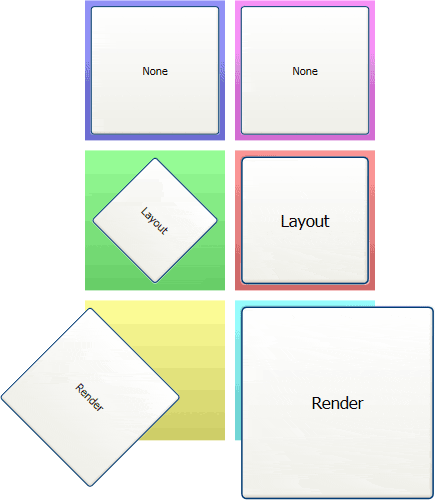
The screenshot shows a two by three Grid, with a Button and a Rectangle within each cell. The first row is used as a control, the Buttons in the second row have a layout-affecting transform, and those in the third have a render-only transform. Here’s the markup:
<Grid xmlns="http://schemas.microsoft.com/winfx/avalon/2005"
      xmlns:x="http://schemas.microsoft.com/winfx/xaml/2005">
  <Grid.RowDefinitions>
    <RowDefinition Height="150" />
    <RowDefinition Height="150" />
    <RowDefinition Height="150" />
  </Grid.RowDefinitions>

  <Grid.ColumnDefinitions>
    <ColumnDefinition Width="150" />
    <ColumnDefinition Width="150" />
  </Grid.ColumnDefinitions>

  <Rectangle Margin="5" Fill="VerticalGradient #99f #66c" />
  <Rectangle Margin="5" Fill="VerticalGradient #f9f #c6c" Grid.Column="1"/>
  <Rectangle Margin="5" Fill="VerticalGradient #9f9 #6c6" Grid.Row="1"/>
  <Rectangle Margin="5" Fill="VerticalGradient #f99 #c66" Grid.Row="1" Grid.Column="1"/>
  <Rectangle Margin="5" Fill="VerticalGradient #ff9 #cc6" Grid.Row="2" />
  <Rectangle Margin="5" Fill="VerticalGradient #9ff #6cc" Grid.Row="2" Grid.Column="1"/>

  <Button Margin="10">None</Button>
  <Button Grid.Column="1" Margin="10">None</Button>

  <TransformDecorator Transform="rotate 45" Grid.Row="1" Margin="10">
    <Button>Layout</Button>
  </TransformDecorator>
  <TransformDecorator Transform="scale 1.5" Grid.Column="1" Grid.Row="1" Margin="10">
    <Button>Layout</Button>
  </TransformDecorator>

  <Button RenderTransform="rotate 45" Grid.Row="2" Margin="10">
    Render
  </Button>
  <Button RenderTransform="scale 1.5" Grid.Row="2" Grid.Column="1" Margin="10">
    Render
  </Button>
</Grid>
As you can see, the cells with render-only transforms end up drawing outside of their cells. Unlike layout-affecting transforms, the render-only transforms do not factor into layout; the content’s layout is performed as usual, with a transformation applied to the final result.