Contextual Alternates
Contextual Alternates are another fun OpenType feature enabled by default throughout Avalon. Below are the words “Contextual Alternates” written with the beautiful Ambiance BT with contextual alternates enabled:

Contextual alternates are enabled by default, so the markup I used for this is quite simple:
<TextFlow FontFamily="Ambiance BT" FontSize="30">
  Contextual Alternates
</TextFlow>
You can, of course, disable alternates. Here is a screenshot of the same words with contextual alternates disabled:

And the markup:
<TextFlow FontFamily="Ambiance BT" FontSize="30"
  Typography.ContextualAlternates="False">
  Contextual Alternates
</TextFlow>
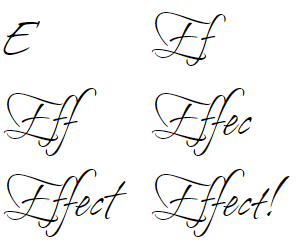
If you compare the two images, the difference is most noticeable in the capital letters at the beginning of each word. These alternates look really cool when you’re typing and the characters are swapped automatically. I’ll close this post with an animated screenshot of typing the word “Effect” with alternates enabled (especially the transition from “E” to “Ef”):